When I build software with Codex, I sometimes pause at the model picker. GPT-6 Astra feels reassuring for complex coding, but moving a button or changing an error message does not always call for the strongest model.
GPT-6.1 Sol changes that choice. OpenAI describes it as a model that offers near-Astra performance for complex coding at a lower cost. For everyday development, it may be worth starting with Sol Medium instead of choosing Astra Low out of habit. That does not mean the two settings perform equally. The GPT-6.1 Sol model page recommends comparing it with Astra on your own tasks.
A comparison at a glance
Reasoning effort controls how deeply a model examines a problem before answering. Think of Light for short, clear tasks; Medium for everyday development; and High for difficult problems. The Light label in Codex corresponds to low in the API and CLI documentation. OpenAI’s Codex model guidance explains that higher reasoning effort can help with complex work, while taking more time and tokens.
| Model | Reasoning effort | Relative capability | Relative token use | Suitable work |
|---|---|---|---|---|
| GPT-5.4 Sol Light | Light | A lightweight, previous-generation reference | Low | A reference point for simple edits |
| GPT-5.4 Sol Medium | Medium | A previous-generation baseline for routine work | Moderate | A reference point for feature edits and code analysis |
| GPT-6.1 Sol Light | Light | Often enough for well-defined work | Low | UI copy, small functions, and minor changes |
| GPT-6.1 Sol Medium | Medium | A balance for everyday development | Moderate | Features, changes across files, and bug fixes |
| GPT-6.1 Sol High | High | Better suited to complex reasoning | High | Difficult bugs and structural changes |
| GPT-6 Astra Low | Low | Strong base capability with lower reasoning effort | Low to moderate | Ambiguous requirements and demanding work |
| GPT-6 Astra Medium | Medium | Suited to the most demanding work | Moderate to high | Large designs and problems across systems |
The capability and token-use labels are rules of thumb for choosing a model, not official benchmark scores or guaranteed usage. Even at the same Medium setting, actual reasoning tokens depend on the model and task. A short Astra run with few retries may use fewer total tokens than a long Sol run. OpenAI has not published a direct, same-task comparison of all seven settings. The general pattern for increasing reasoning effort comes from its reasoning guide.
“GPT-5.4 Sol” is a convenient label for this comparison. The official API model ID is gpt-5.4, and it retired from Codex with ChatGPT sign-in on August 31, 2026. This table is not suggesting that you switch back to it. Availability in the API and in Codex with an API key is a separate matter. See the Codex model list and retirement notice.
How much better is it than GPT-5.4?
GPT-5.4 could already work across files and edit code. The change with GPT-6.1 Sol is that I can try more demanding work while keeping cost in mind. OpenAI places it near Astra for complex tasks, but the published information does not establish a percentage improvement in coding success over GPT-5.4 or a percentage reduction in reasoning tokens on the same task. See the GPT-5.4 model page and GPT-6 guide.
The practical difference is where to start. I used to move straight to Astra Low or Medium whenever a task looked somewhat complex. Now it seems reasonable to ask Sol Medium to implement and verify the change first, then inspect the result. If it misses requirements or the scope grows, I can move up. This is a usage strategy inferred from the model descriptions, not an official performance measurement.
Move from Light to Medium to High to Astra
GPT-6.1 Sol Light: small scope and a clear answer
Light fits work where the file and desired change are fairly clear: changing a button color, editing copy, or adjusting a condition in a small function. It is also worth trying for a repetitive rule applied across several files.
For example, I would start with Light for “Change this button’s label and adjust only its spacing on mobile.” Then I would check the changed screen or test result and request any needed correction.
GPT-6.1 Sol Medium: a default for everyday development
I recommend Medium as a starting point for adding features, changing several files, fixing ordinary bugs, and refactoring. It also fits tasks that change both UI and logic after reading the existing code. The model needs room to find related files and plan the scope of the change.
For example, “Add a search box, filter the list as I type, and check the mobile layout” suits Medium better than Light. Trying Sol Medium before Astra Low may give a good result for the usage spent on many routine tasks. That is a hypothesis to test on each kind of work, not an equation that says Sol Medium = Astra Low.
GPT-6.1 Sol High: when repeated attempts do not solve it
Move to High for bugs with hard-to-find causes, changes spanning multiple modules, or structural changes. If Medium keeps making edits and the same error returns, summarize the attempts and error logs before passing them to High.
An example is “The session sometimes expires after login. Find the conditions that reproduce it and inspect the state flow across the server and frontend.” Higher reasoning effort gives the model more room to examine causes and alternatives, but it does not guarantee a better result every time.
GPT-6 Astra Low or Medium: when a wrong call costs more
Choose Astra if Sol High still cannot solve the problem, or if a mistaken decision would be costly to undo, as with a large architecture change. For connected systems and ambiguous requirements, I would start with Astra Low. For a long design, implementation, and verification process that needs sustained context, I would consider Medium. OpenAI also positions Astra for the hardest end-to-end work. See its model-selection guidance.
Which is more efficient: Astra Low or Sol Medium?
A stronger model at a lower reasoning effort and a less expensive model at a medium effort are different choices. Astra Low can use the model’s base capability to identify the key issue quickly. Sol Medium gives a lower-cost model more reasoning room.
Sol Medium may finish an ordinary feature change in one attempt. For a vague bug or work that requires decisions across several tools, Astra Low might finish with fewer retries. In that case, total time and usage for the task could be lower despite choosing the more expensive model. OpenAI also says Astra achieved strong results with fewer output tokens in some evaluations. See the GPT-6 guide.
So I would compare more than the length of one answer: the number of retries, correctness of the code, passing tests, and time to the desired result all matter. For work I do often, I could give several similar tasks to Sol Medium and Astra Low and compare the outcomes.
API token prices and Codex usage are different
A token is a unit used to count the text a model reads and writes. The API charges separately for input and output tokens. As of September 30, 2026, standard API pricing for requests of ordinary length is $2 per million input tokens and $10 per million output tokens for GPT-6.1 Sol, compared with $10 and $50 for GPT-6 Astra. Caching, long context, and processing mode can change the price. See the GPT-6.1 Sol pricing and GPT-6 Astra pricing.
The model also uses reasoning tokens before it answers. Increasing reasoning effort generally raises reasoning work and time, but actual use varies by request; High cannot simply be priced as twice Medium. API model prices, actual reasoning-token use, and the usage or limits you experience when signing in to Codex with a ChatGPT account are different measures. Do not apply the API price ratio directly to the Codex usage display. See the reasoning guide and Codex model guidance.
Select the new model in VS Code
In VS Code’s Extensions view, find Codex – OpenAI’s coding agent by OpenAI. If the installed extension has an update, apply it, reopen the Codex panel, and click the model name below the input box to inspect the list. The screenshot shows where to confirm the official publisher on the extension page.
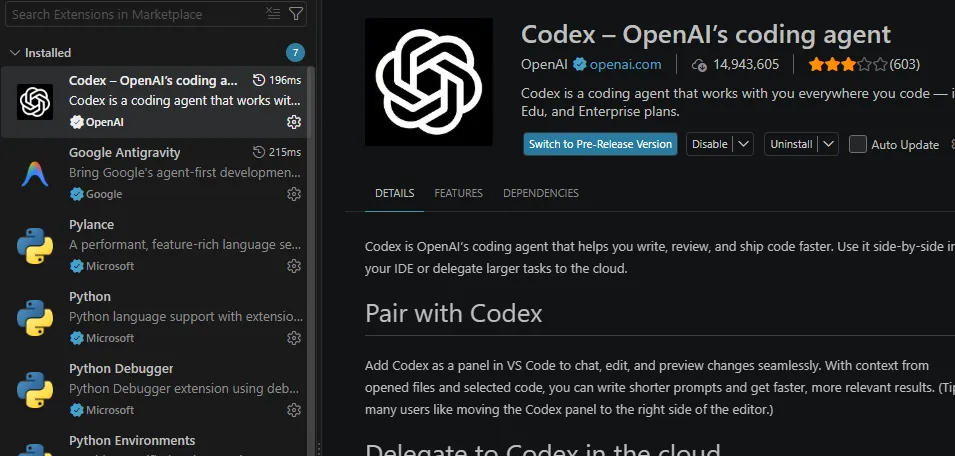
The extension page confirms OpenAI as the publisher. An Update button appears if you have not updated yet or automatic updates have not applied. Whether the new model appears also depends on your account and rollout status.
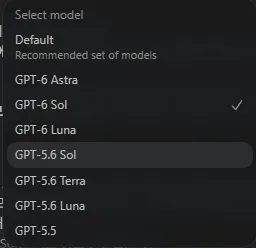
Click the model name below the input box to open the selection menu. The models shown can differ by account and the date of the screenshot.
If GPT-6.1 Sol appears, select it and then choose Light, Medium, or High for the task. If the list only shows Astra, GPT-6 Sol, and GPT-5.6 models, GPT-6.1 Sol has not appeared in that environment yet. If updating does not help, check your account and organization settings and whether the rollout has reached you. OpenAI says availability varies by plan, client, organization settings, and rollout timing. See the Codex model guidance and IDE extension guide.
How I plan to choose
Codex may have weekly usage limits depending on the account. If I routinely finish a week with plenty of usage left, I can keep using models as before. If usage is usually tight, Sol Medium is worth trying as my default in place of Astra Low.
GPT-6.1 Sol has only just launched, so I plan to try it in different situations for about a month and adjust my choices based on what works best. For now, I will choose by task difficulty:
Simple edit → GPT-6.1 Sol Light
Everyday development → GPT-6.1 Sol Medium
Difficult problem → GPT-6.1 Sol High
Still unresolved → GPT-6 Astra Low/Medium
I think raising reasoning effort and model capability step by step as the task requires is a useful starting point for using tokens efficiently. When a retry would be costly, starting with Astra may be more efficient.
As a side note, the web version’s home screen was substantially redesigned today, and I saw a scheduling feature. I have set it up to review my email regularly and tell me which messages need my response.