Revising a manuscript takes time beyond editing its content. Adding an earlier citation prompts another numbering check, and a change of target journal means reviewing both in-text citations and the bibliography. Connecting Zotero and Word to Codex makes it possible to request these edits in natural language.
The friction of editing references without AI
- A change in citation order prompts another numbering check. Adding an earlier source or moving a paragraph changes later numbers. Manually typed numbers or disconnected citation fields make it harder to tell which number belongs to which paper.
- A different target journal requires another style review. Beyond numeric versus author–date citations, requirements can differ for author lists, journal abbreviations, and DOIs. The available reference-manager style may not exactly match the journal’s requirements.
- A formatting error can require checking individual records. Incorrect author names, years, titles, or DOIs carry through to the bibliography. The underlying metadata must be corrected, and the updated manuscript still needs checking.
- Revising a sentence means finding its citation again. The writer must remember which paper supports the claim, locate the passage in Word, and select the right record in the library.
Reference managers already automate numbering and style updates. An AI connection also lets a single request cover finding the passage and source, performing the edit, and checking the result.
What natural-language editing makes easier
Cite the 2023 paper by Mirone and colleagues after this sentence, then update the bibliography.
The target journal has changed. Apply its required APA 7 format to both the in-text citations and the bibliography.
Describe the passage and the desired result, and Codex can locate the sentence, identify the source in Zotero, and edit Word’s citation fields. Zotero updates the numbering and formatting. The researcher can review the result without repeatedly navigating between the document and library.
This connects literature collection with requests such as “cite this paper after that sentence,” “revise the paragraph while preserving its citations,” and “switch to APA 7.” If the required journal style is unavailable, a suitable CSL style must still be obtained or edited; connecting AI does not itself guarantee compliance with the journal’s instructions.
Tools that connect Zotero and Word to AI
Zotero is a reference manager like Mendeley or EndNote. If you have used either, its purpose will be familiar: organize papers and insert citations and bibliographies into Word. Zotero is open source and manages bibliographic records and PDFs, while the Zotero Word Add-in refreshes citation fields and the bibliography. We added two connections for an AI agent:
- Zotero MCP: 54yyyu/zotero-mcp provides library search and operations for papers, attachments, and notes.
- Word MCP plus connection scripts: Windows Word automation tools extend Office Word MCP Server to locate passages and insert Zotero citation fields.
- An AI agent: Interprets the requested document, passage, source, and style, calls the appropriate tools, and checks the result.
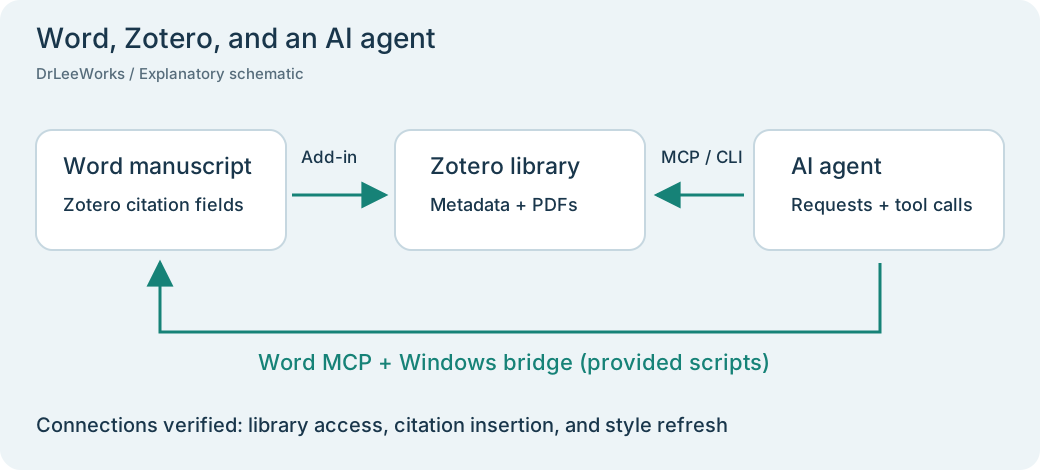
The connections used in this exercise. Word citation editing uses the additional scripts provided below; this Zotero connection is not automatically included in a standard Word MCP installation.
The researcher specifies which claim needs which source. The agent locates that passage and performs the edit, while Zotero calculates citation numbers and applies the selected style.
Set up Word and Zotero for natural-language requests
In a Codex or Claude chat with access to local applications and files, ask: “Install the Word and Zotero MCP servers and set up an environment where I can add and edit citations and change reference styles through natural-language requests.” The AI can handle most of the installation and connection work. If something does not work, follow the steps below and share the error message or current state with the AI for help where you get stuck.
The October 17, 2026 exercise used Zotero 10.0.6, Zotero MCP 0.15.1, Office Word MCP Server 1.1.11, uv 0.13.1, and Windows desktop Word 16.0.20430.20146. We checked both the installed Word Add-in file and its loaded state.
1. Prepare Zotero and its Word Add-in
Install and start Zotero. Enable Settings → Advanced → Miscellaneous → Allow other applications on this computer to communicate with Zotero. If Word has no Zotero tab, install the Add-in under Zotero Settings → Cite → Word Processors. See the official installation instructions.
2. Install uv and Zotero MCP
Follow the official uv installation guide in PowerShell:
powershell -ExecutionPolicy ByPass -c "irm https://astral.sh/uv/install.ps1 | iex"Open a new PowerShell session and install the tool:
uv tool install "zotero-mcp-server==0.15.1"
zotero-mcp version
$env:ZOTERO_LOCAL = "true"
zotero-cli --json get recent --limit 1
A successful connection with zero results may simply indicate an empty library. Our exercise began with an empty-library read before adding papers. To save items and PDFs through Zotero 10’s local API, authorize writes:
zotero-mcp authorize-localChoose Always Allow in Zotero’s dialog when saving several items and attachments consecutively. In our setup, an initial single-use grant was followed by another authorization to obtain a reusable key. The project’s getting-started guide explains connection modes and permissions.
We registered the server in Codex as follows. Other AI applications use their own MCP configuration:
codex mcp add zotero --env ZOTERO_LOCAL=true -- zotero-mcp serve --transport stdio3. Add the Word–Zotero connection tools
uv tool install "office-word-mcp-server==1.1.11"Download the Word connection script and MCP launcher into the same Documents/word-zotero-bridge folder. Keep the filenames word_zotero.py and word_server.py. Together, they extend the standard Word MCP with the citation tools used here.
Register uv’s Word Python environment and the launcher in Codex:
$toolRoot = uv tool dir
$wordPython = Join-Path $toolRoot "office-word-mcp-server\Scripts\python.exe"
$bridgeScript = Join-Path $env:USERPROFILE "Documents\word-zotero-bridge\word_server.py"
codex mcp add word --env PYTHONIOENCODING=utf-8 -- $wordPython $bridgeScript
codex mcp get word
If Documents is redirected to OneDrive or another location, adjust $bridgeScript to the actual saved path. We also added startup_timeout_sec = 30 and tool_timeout_sec = 120 to the generated [mcp_servers.word] section in Codex configuration. Restart Codex and check both connections. These scripts were tested with Windows desktop Word and the default local personal Zotero library.
Practical examples
Every example below began with a natural-language request from the user, with the AI executing the necessary tools. From collecting papers and drafting the introduction to adding citations, revising text, and changing reference styles, the user requested the work without having to write code or operate Word’s menus step by step.
We drafted a hypothetical introduction on metal tensile testing and stress–strain analysis and saved four real open-access papers in Zotero. In Windows desktop Word, tool calls corresponding to natural-language requests added a citation, revised text, and switched between IEEE and APA. For this English article, we translated all nine body paragraphs of the Korean manuscript and repeated the citation-insertion and style-change demonstrations. Every Word capture below shows that English manuscript; the installed Word interface remains in Korean.
| Task | Observed result |
|---|---|
| Literature collection | Four real papers and their PDFs saved in a dedicated Zotero collection |
| Attachment verification | SHA-256 hashes matched for all four downloaded and Zotero-stored PDFs |
| Introduction draft | Seven live Zotero citation fields and four bibliography entries |
| Citation insertion | An additional citation increased the field count to eight |
| Text revision | Existing Zotero fields survived an edit to the surrounding text |
| Submission format | The same manuscript changed IEEE → APA 7 → IEEE, with citations and bibliography refreshed |
The research objective in the introduction is hypothetical. The references are real papers; the draft does not report newly performed experiments or measurements. Each Zotero item also has a note recording the proposed citation location and supporting source passages.
Exercise 1 Download papers and save them in Zotero
The initial request took this form:
Draft an introduction on metal tensile testing and stress–strain analysis. Find real supporting papers, download their PDFs into Zotero, and explain where to cite them.
We obtained open full texts for these four papers. DOI metadata were compared with PDF titles and authors, and each PDF was attached to its parent record in a dedicated collection.
| Paper | Role in the introduction |
|---|---|
| Tu et al., 2020 | Stress–strain definitions and the background to post-necking interpretation |
| Kim et al., 2025 | 2D DIC and cross-section estimation for low-carbon steel sheet |
| Mirone et al., 2023 | Sheet anisotropy and assumptions behind stress–strain reconstruction |
| Świłło and Cacko, 2023 | Vision extensometry, neck geometry, and measurement comparisons |
Notes recorded the target paragraph, supporting section and PDF page, supported claim, and limits on generalization. This makes the reason for choosing a source easier to revisit during revision. Tu’s review first appeared online in 2019; we used the final journal issue year, 2020, in the bibliography.
Exercise 2 Insert a citation and update numbering
The initial order of first citation was Tu, Kim, Mirone, then Świłło and Cacko. Under IEEE, these were [1], [2], [3], and [4].
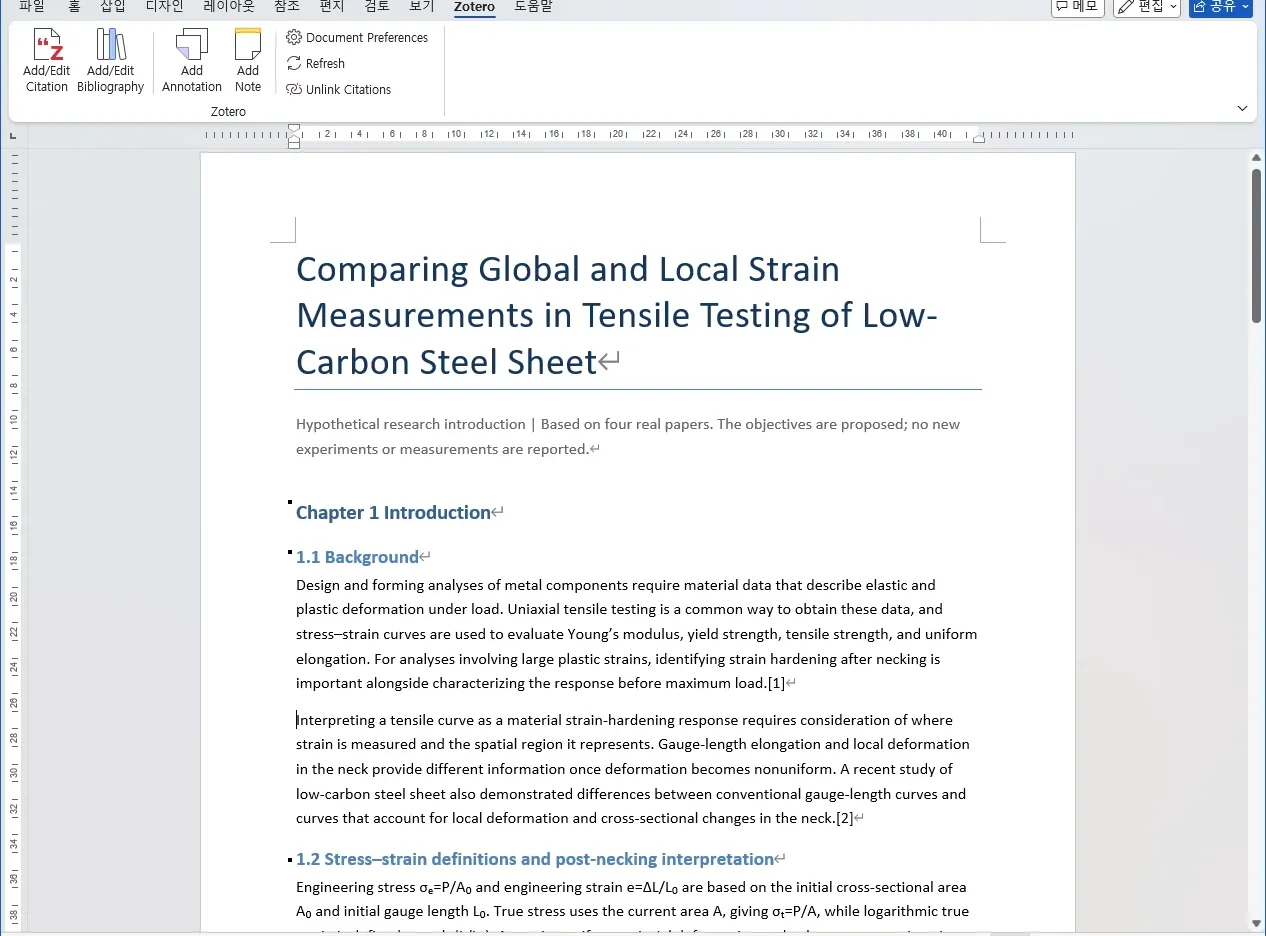
Actual Word capture of the English manuscript before insertion. The paragraph ends with Kim et al. [2].
We then specified the passage and source author/year together:
In section 1.1, cite Mirone et al.’s 2023 paper after the sentence comparing gauge-length elongation with local deformation in the neck. Refresh the bibliography.
The connection tool located the sentence, inserted a field linked to the Mirone item in Zotero, and ran Zotero Refresh. Mirone now appeared before Kim, so the numbering changed accordingly.
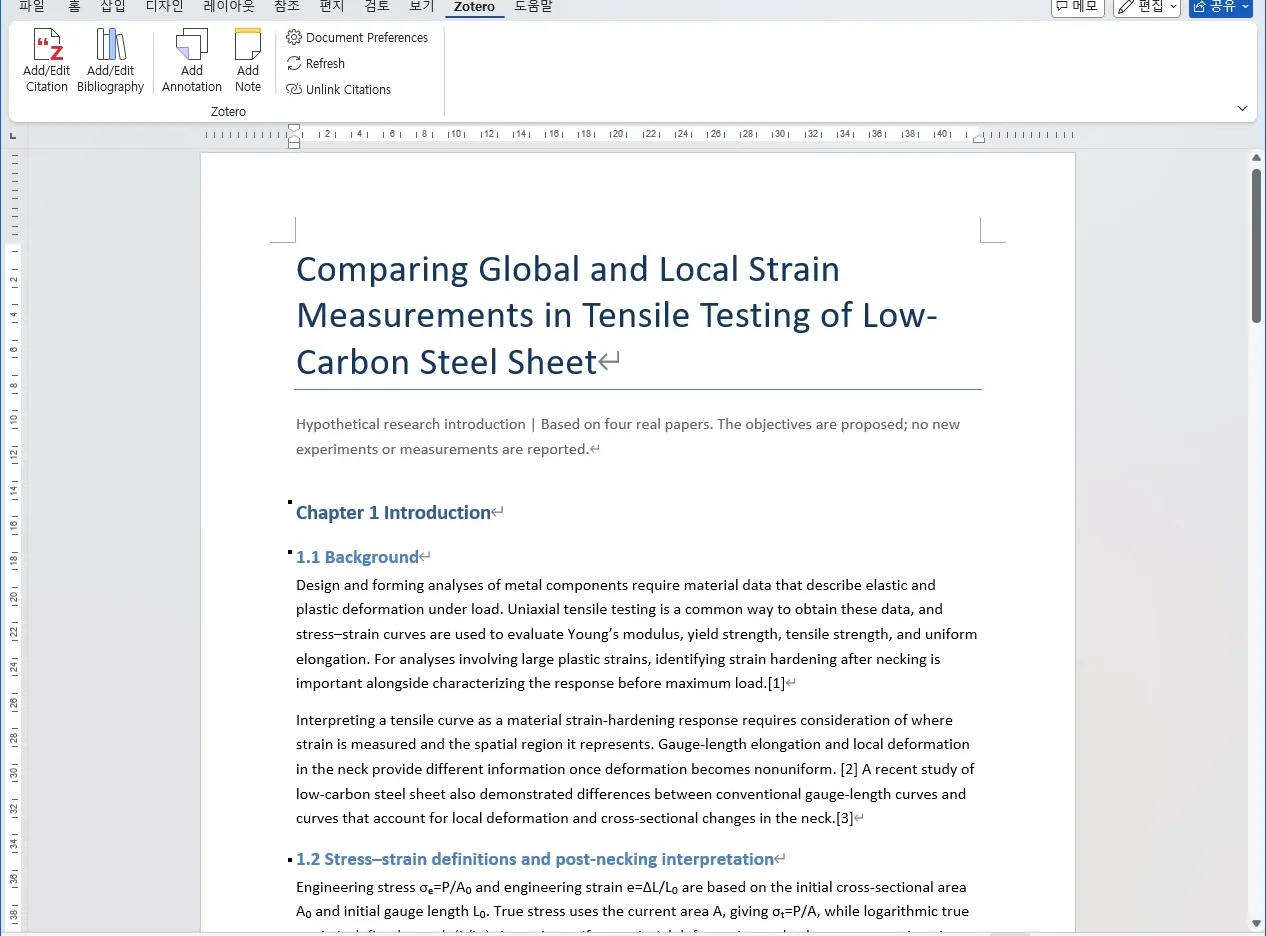
Actual Word capture of the English manuscript after insertion. Mirone is [2] at the new location, and Kim becomes [3].
| Source | Before | After |
|---|---|---|
| Tu et al. | [1] | [1] |
| Kim et al. | [2] | [3] |
| Mirone et al. | [3] | [2] |
| Świłło and Cacko | [4] | [4] |
This example cites an existing source at an earlier location. Citation fields increased from seven to eight, while the number of distinct references remained four. The bibliography followed the revised order of first citation.
There is no need to repeat a full title every time, but adding a title fragment or DOI helps when an author has several papers from the same year. A unique sentence is also easier to locate than a request to insert something somewhere in the introduction.
Exercise 3 Revise text while preserving citations
Text can be revised through a request such as:
Make this paragraph more concise while preserving the existing Zotero citations and links.
In the connection test, we located a unique passage, replaced its surrounding Word text, and checked that the existing citation field survived. We then inserted another citation, changed to APA, and returned to IEEE. Both the original and added citations continued to refresh after the text edit.
Changing the source inside an existing citation or editing page locators requires support from the chosen connection tool. The scripts below were verified for text replacement, citation insertion, reading fields, style changes, and refresh.
Check evidence and citation locations
Find the original passage supporting this sentence and suggest the evidence page and citation location.
Have the agent inspect experimental conditions and results beyond the title and abstract. In this exercise, we recorded evidence locations and limits for each source—for example, to avoid presenting an error measured on one specimen as a result applying to every steel grade. Distinguish PDF page positions from printed page numbers.
Researchers still need to review whether a citation supports its claim. Check the connections first when a manuscript contains manually typed numbers or citations from another reference manager. We used manuscript copies, and the connection script makes a backup before changes.
Exercise 4 Change reference style for a different journal
The intended journal can change during revision. Here we simulated moving from numeric IEEE formatting to a submission venue requiring APA 7. This is an editing exercise with an already specified style, rather than a determination of a particular journal’s submission rules.
First, we inspected the IEEE bibliography after inserting the earlier citation. Its entries followed the order of first appearance in the text.
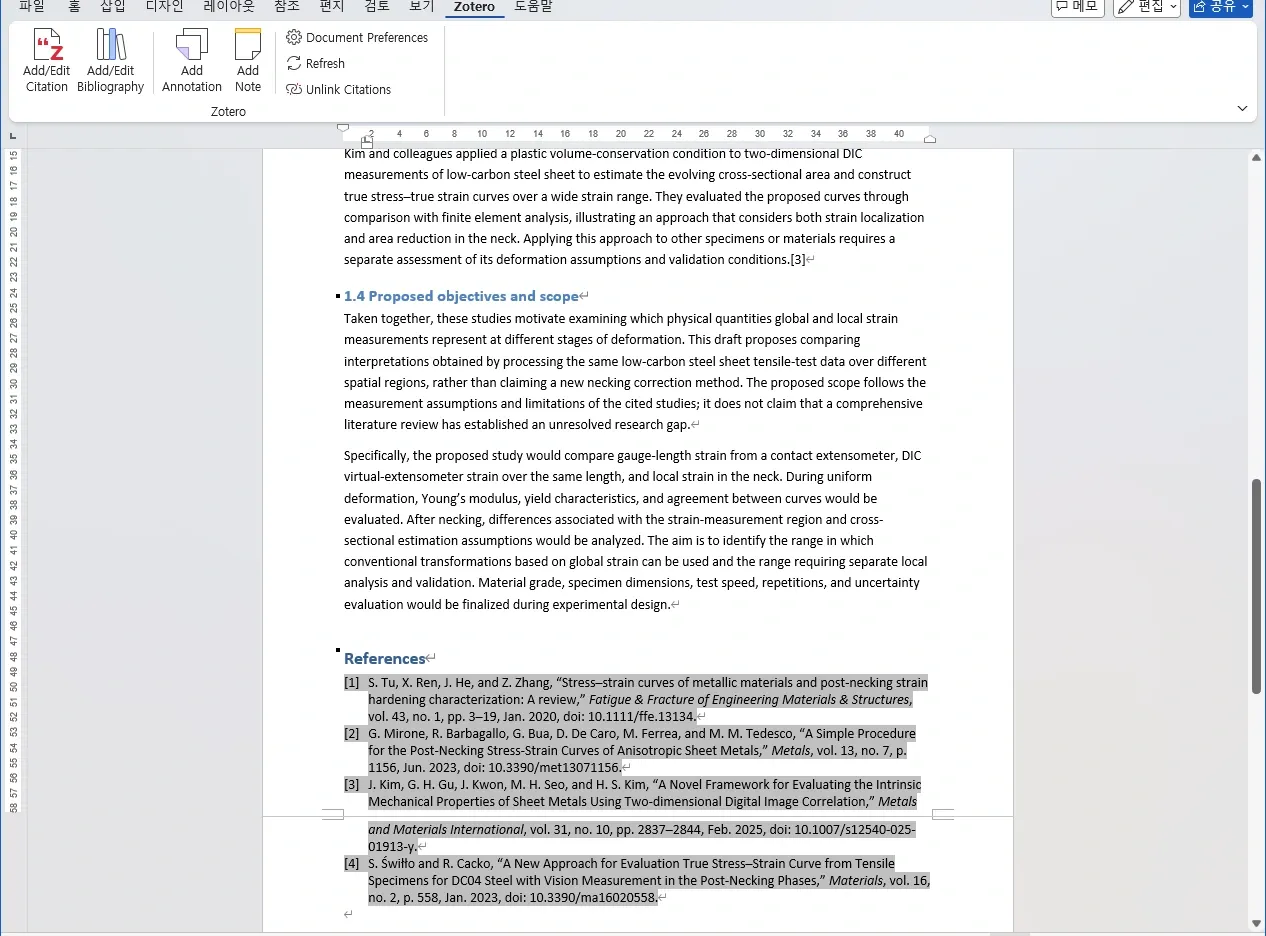
Before the change: IEEE formatting in the same manuscript, with numeric in-text citations.
We then executed the following request:
The target journal has changed. Apply its required APA 7 style to both the in-text citations and bibliography, then refresh. Preserve the Zotero connections.
The agent called the Word connection tool with the Zotero style apa and ran Refresh. In the body, numeric citations such as [1] became author–date citations such as (Tu et al., 2020).
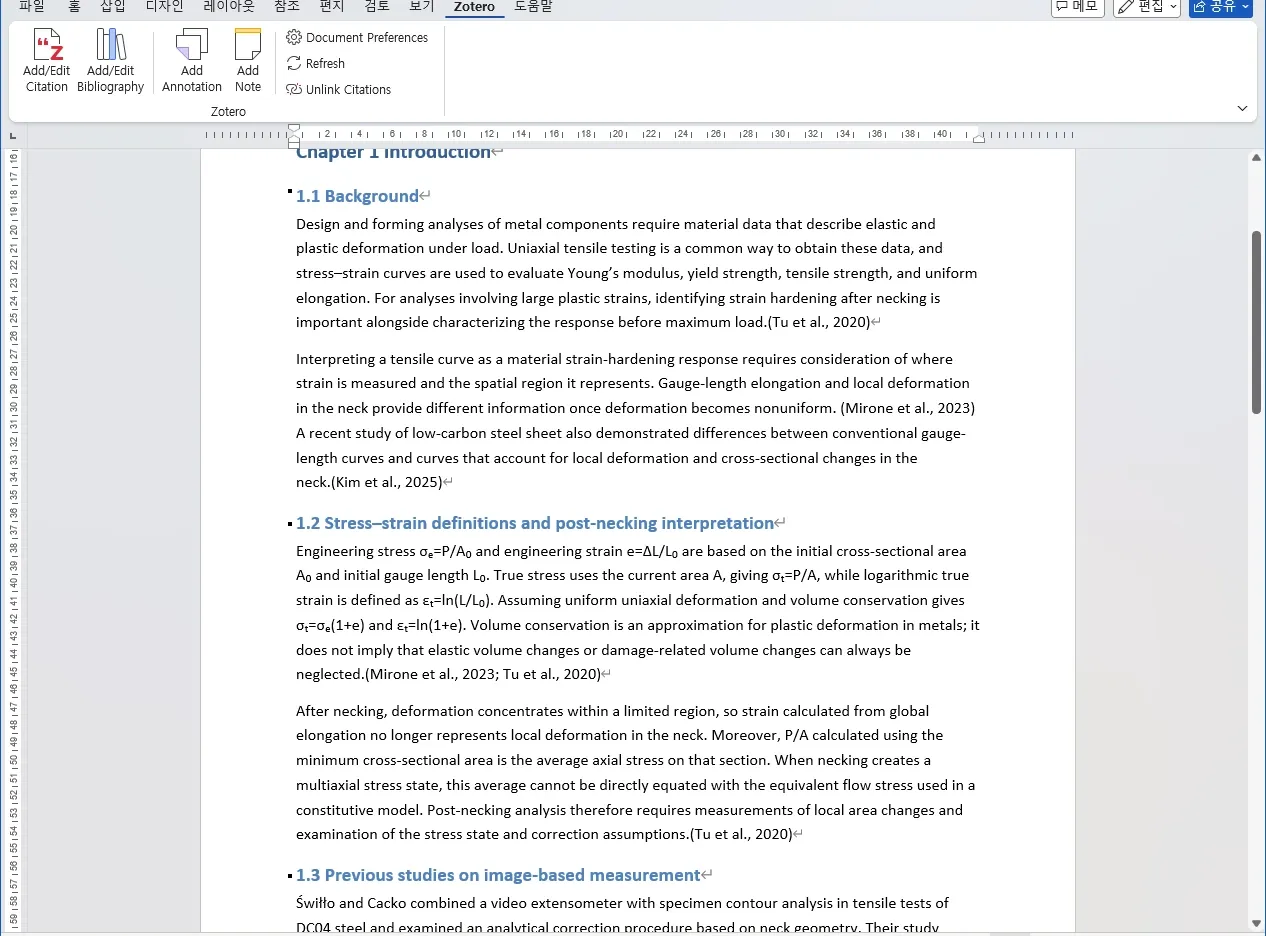
After the change: APA author–date citations generated from the connected sources.
The bibliography changed too. These four papers were reordered by author as Kim, Mirone, Świłło, and Tu, with APA formatting for the year, title, journal, and DOI.
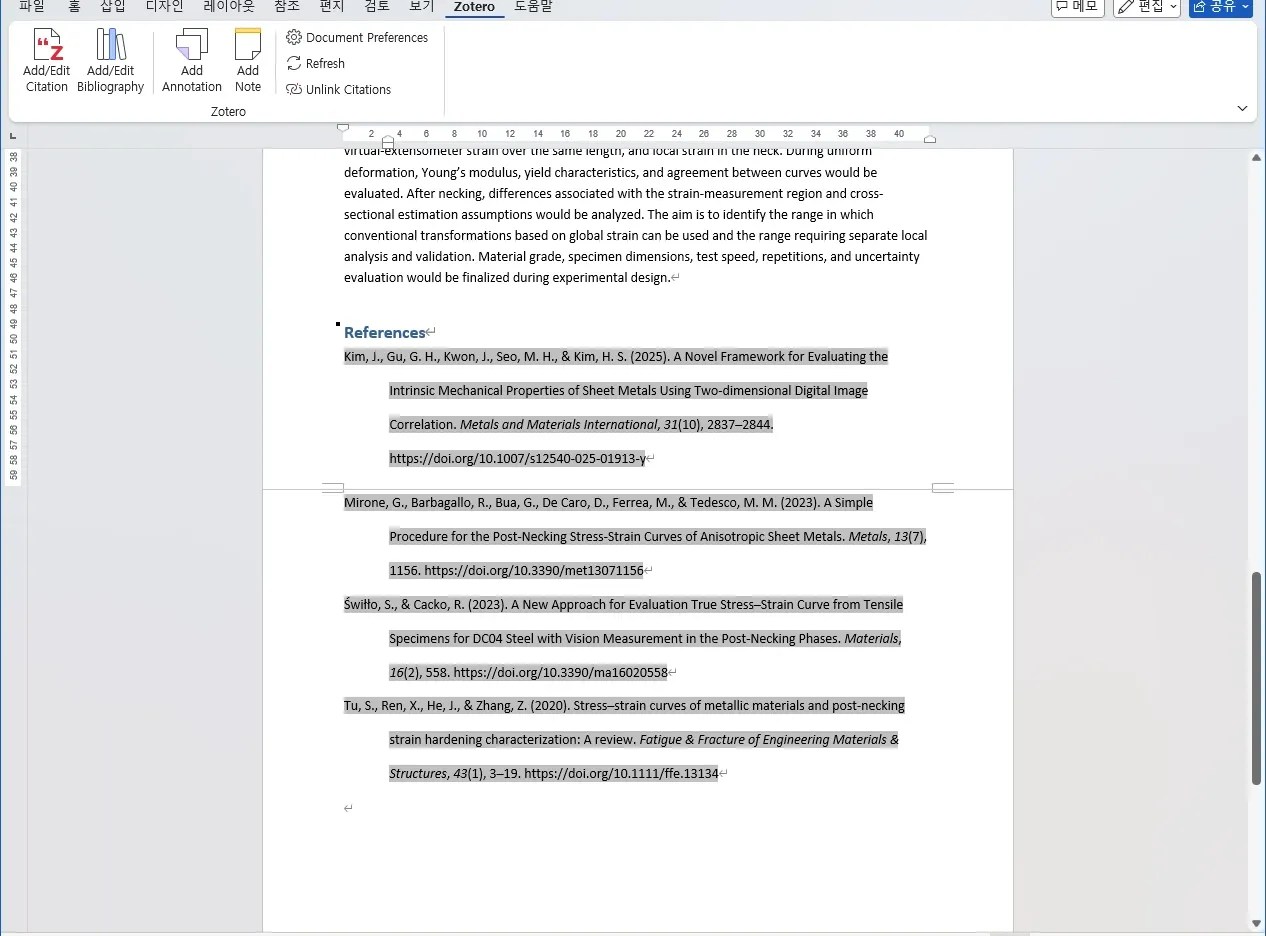
After the change: the same manuscript and the same four sources as in the IEEE capture.
| Check | IEEE | APA 7 |
|---|---|---|
| In-text citations | [1], [2], etc. | (Tu et al., 2020), etc. |
| Bibliography order | First citation | First-author names for these sources |
| In-text citation fields | Eight | Eight retained |
| Distinct references | Four | Four retained |
| Zotero links | Retained | Retained |
Finally, we executed a request to return to numeric IEEE formatting and refreshed again. Both in-text citations and the bibliography changed while retaining the same source connections. For an actual submission, identify the exact style and edition in the journal’s instructions for authors before applying it.